#----Glide--- start
-keep public class * implements com.bumptech.glide.module.GlideModule
-keep public class * extends com.bumptech.glide.module.AppGlideModule
-keep public enum com.bumptech.glide.load.resource.bitmap.ImageHeaderParser$** {
  **[] $VALUES;
  public *;
}

#---Glide V4.X
-dontwarn com.bumptech.glide.load.engine.bitmap_recycle.LruBitmapPool
-dontwarn com.bumptech.glide.load.resource.bitmap.Downsampler
-dontwarn com.bumptech.glide.load.resource.bitmap.HardwareConfigState
#----Glide--- end
Mastering Kotlin standard functions: run, with, let, also and apply
Some of the Kotlin’s standard functions are so similar that we are not sure which to use. Here I will introduce a simple way to clearly distinguish their differences and how to pick which to use.
Scoping functions
The functions that I’ll focus on is run, with, T.run, T.let, T.also and T.apply. I call them scoping functions as I view their main functionality as provide an inner scope for the caller function.
The simplest way to illustrate scoping is the run function
fun test() { var mood = "I am sad"
run{ val mood = "I am happy" println(mood) // I am happy } println(mood) // I am sad }
With this, inside the test function, you could have a separate scope where mood is redefined to I am happy before printing, and it is fully enclosed within the run scope.
This scoping function itself seems not very useful. But there’s another nice bit it has than just the scope; it returns something i.e. the last object within the scope.
Hence the below would be neat, where by we can apply the show() to both views as below, without calling it twice.
run{ if (firstTimeView) introView else normalView }.show()
3 attributes of scoping functions
To make scoping functions more interesting, let me categorize their behavior with 3 attributes. I will use these attributes to distinguish them from each others.
1. Normal vs. extension function
If we look at with and T.run, both functions are actually pretty similar. The below does the same thing.
In this case, clearly T.run extension function is better, as we could apply check for nullability before using it.
2. This vs. it argument
If we look at T.run and T.let, both functions are similar except for one thing, the way they accept the argument. The below shows the same logic for both functions.
stringVariable?.run {
      println("The length of this String is $length")
}
// Similarly.
stringVariable?.let {
      println("The length of this String is ${it.length}")
}
If you check the T.run function signature, you’ll notice the T.run is just using made as extension function calling block: T.(). Hence all within the scope, the T could be referred as this.In programming, this could be omitted most of the time. Therefore in our example above, we could use $length in the println statement, instead of ${this.length}. I call this as sending in this as argument.
However for T.let function signature, you’ll notice that T.let is sending itself into the function i.e. block: (T). Hence this is like a lambda argument sent it. It could be referred within the scope function as it. So I call this as sending in it as argument.
From the above, it does seems like T.run is more superior over T.let as it is more implicit, but there are some subtle advantages of T.let function as below: -
The T.let does provide a clearer distinguish use the given variable function/member vs. the external class function/member
In the event that this can’t be omitted e.g. when it is sent as a parameter of a function, it is shorter to write than this and clearer.
The T.let allow better naming of the converted used variable i.e. you could convert it to some other name.
stringVariable?.let {
      nonNullString ->
      println("The non null string is $nonNullString")
}
3. Return this vs. other type
Now, let’s look at T.let and T.also, both are identical, if we look into the internal function scope of it.
stringVariable?.let {
      println("The length of this String is ${it.length}")
}
// Exactly the same as below
stringVariable?.also {
      println("The length of this String is ${it.length}")
}
However their subtle different is what they return. The T.let returns a different type of value, while T.also returns the T itself i.e. this.
Both are useful for chaining function, where byT.let let you evolve the operation, and T.also let you perform on the same variable i.e. this.
Simple illustration as below
val original = "abc"
// Evolve the value and send to the next chain original.let{ println("The original String is $it") // "abc" it.reversed() // evolve it as parameter to send to next let }.let{ println("The reverse String is $it") // "cba" it.length // can be evolve to other type }.let{ println("The length of the String is $it") // 3 }
// Wrong // Same value is sent in the chain (printed answer is wrong) original.also{ println("The original String is $it") // "abc" it.reversed() // even if we evolve it, it is useless }.also{ println("The reverse String is ${it}") // "abc" it.length // even if we evolve it, it is useless }.also{ println("The length of the String is ${it}") // "abc" }
// Corrected for also (i.e. manipulate as original string // Same value is sent in the chain original.also{ println("The original String is $it") // "abc" }.also{ println("The reverse String is ${it.reversed()}") // "cba" }.also{ println("The length of the String is ${it.length}") // 3 }
The T.also may seems meaningless above, as we could easily combine them into a single block of function. Thinking carefully, it has some good advantages
It can provide a very clear separation process on the same objects i.e. making smaller functional section.
It can be very powerful for self manipulation before being used, making a chaining builder operation.
When both combine the chain, i.e. one evolve itself, one retain itself, it becomes something powerful e.g. below
// Normal approach
fun makeDir(path: String): File  {
    val result = File(path)
    result.mkdirs()
    return result
}
By looking at the 3 attributes, we could pretty much know the function behavior. Let me illustrate on the T.apply function, as it has not be mentioned above. The 3 attributes of T.apply is as below…
It is an extension function
It send this as it’s argument.
It returns this (i.e. itself)
Hence using it, one could imagine, it could be be used as
// Normal approach
fun createInstance(args: Bundle) : MyFragment {
    val fragment = MyFragment()
    fragment.arguments = args
    return fragment
}
Or we could also making unchained object creation chain-able.
// Normal approach
fun createIntent(intentData: String, intentAction: String): Intent {
    val intent = Intent()
    intent.action = intentAction
    intent.data=Uri.parse(intentData)
    return intent
}
// Improved approach, chaining fun createIntent(intentData: String, intentAction: String) = Intent().apply{ action = intentAction } .apply{ data = Uri.parse(intentData) }
Function selections
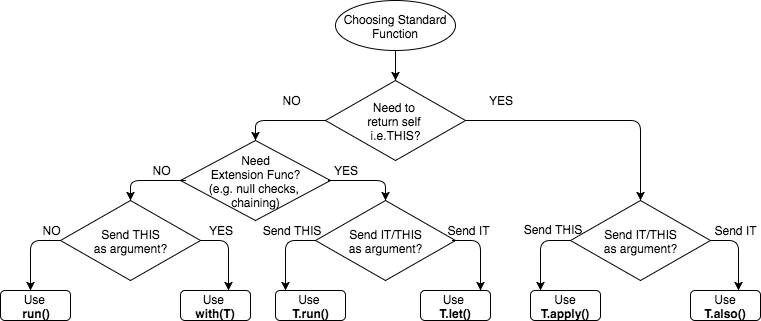
Hence clearly, with the 3 attributes, we could now categorize the functions accordingly. And based on that, we could form a decision tree below that could help decide what function we want to use pending on what we need.
Hopefully the decision tree above clarifies the functions clearer, and also simplifies your decision making, enable you to master these functions usage appropriately.
Feel free to provide some good real example of how you use these functions as response to this blog. I would love to hear from you. This may benefits others.
I hope you appreciate this post and it’s helpful for you. Do share with others.
You could check out my other interesting topics here.
Follow me on medium,TwitterorFacebook for little tips and learning on Android, Kotlin etc related topics. ~Elye~